
How to Fix iPhone Random Restarts with Panic Logs
Is your iPhone restarting randomly? Learn how to use panic logs to diagnose crashes, identify error codes, and fix hardware or software issues. Complete troubleshooting guide with device-specific error codes.
Is your iPhone restarting randomly without warning? It's one of the most frustrating issues for Apple users, disrupting calls, apps, and even risking data loss. While some causes are simple — like a failing battery — others are hidden deep in the system. That's where Panic Logs come in.
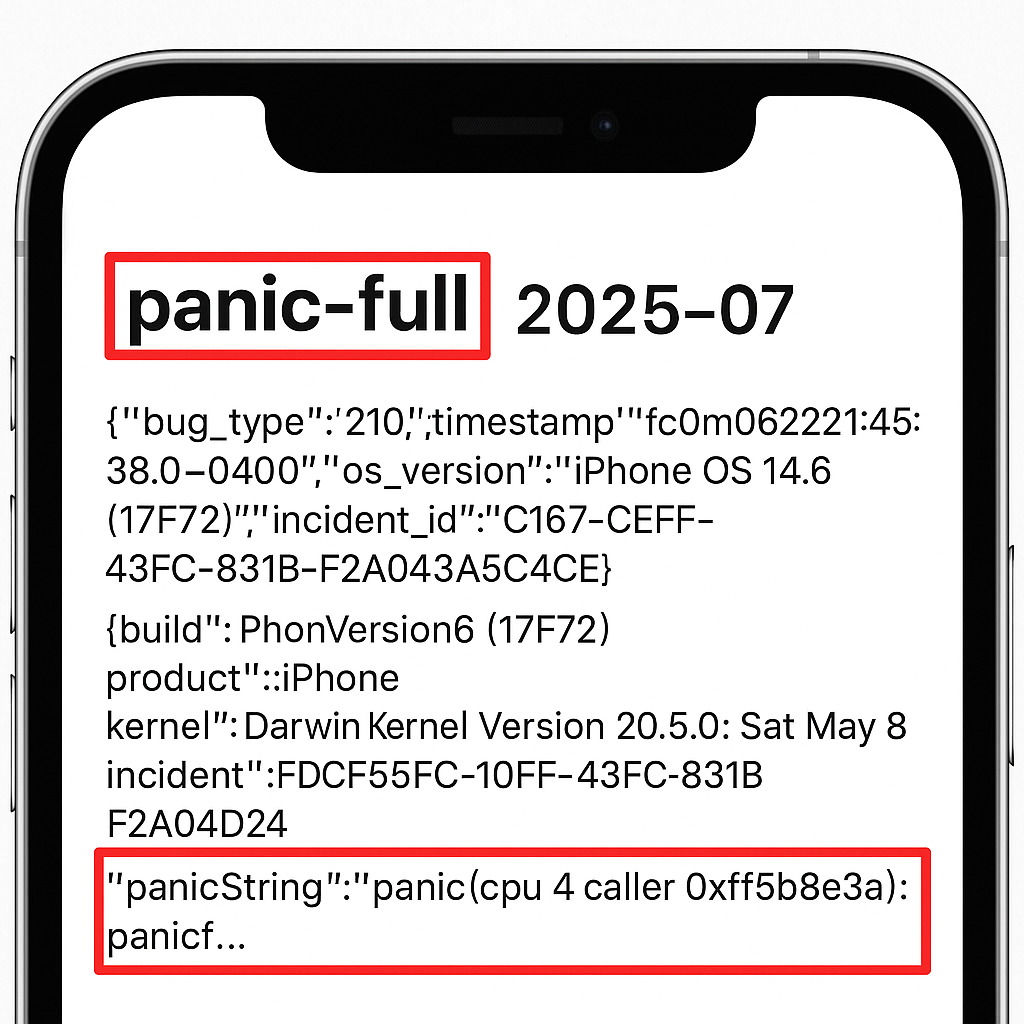
Panic logs are diagnostic reports that your iPhone automatically generates whenever it encounters a serious crash or system failure. By learning how to access and interpret these logs, you can narrow down whether the problem is software-related (apps, iOS bugs) or hardware-related (battery, charging port, logic board).
This guide will walk you through how to use panic logs to troubleshoot iPhone restarts, the most common error codes by device, and when to seek professional repair.
What Are Panic Logs on iPhone?
Panic logs, also known as Kernel Panic Logs, are detailed crash reports stored by iOS. They act like a "black box" for your iPhone, recording what happened right before the device restarted.
- If the log shows process or watchdog errors → the issue may be software/app-related.
- If the log points to sensors, battery, or CPU → it's more likely a hardware fault.
Common Causes of Random iPhone Restarts
- Battery issues – A degraded, faulty, or swollen battery can trigger shutdowns.
- Charging port or flex cable faults – Poor connections may cause panic resets.
- Logic board damage – Drops, liquid, or "sandwich separation" on newer models.
- Overheating – Heavy use such as gaming or charging can overheat the CPU.
- Faulty apps or iOS bugs – Outdated or incompatible apps may cause crashes.
How to Find Panic Logs on iPhone
You can quickly access panic logs on your iPhone:
Each panic log contains detailed text, often with codes such as mic1, 0x400, or CPU Machine Check.
How to Read Panic Logs
Panic logs look technical, but some patterns are easy to recognize:
- "Userspace watchdog timeout" → Usually linked to apps or iOS crashing.
- "Missing sensor(s): prs0, mic1, prox0" → Hardware sensor or flex cable issue.
- "CPU Machine Check" → Overheating or logic board damage.
- Codes like
0x400or0xa1→ Point to hardware faults such as battery or charging port flex.
Troubleshooting Steps Before Repair
Before heading to a repair shop, try these steps:
If the panic logs keep pointing to hardware problems, professional repair is the next step.
Common Panic Log Errors by iPhone Model
Here are frequent panic log issues by generation:
iPhone 11 & Older
- mic1 – Charging port flex
- prs0 – Battery connector issue
- Userspace watchdog timeout – App or iOS crash
- Thermalmonitord – Overheating
iPhone 12 Series
- mic1 / mic2 – Charging port or power button flex
- tg0b – Battery or battery data line fault
- ans2 – NAND (storage) issue
- CPU Machine Check – Logic board instability
iPhone 13 Series
- 0x800 – Charging port flex
- 0x1000 – Proximity flex
- 0x1800 – Charging port + proximity flex
- 0x400 – Sandwich separation (board-level fault)
iPhone 14 & 14 Plus
- 0x400000 – Wireless charging flex (back glass)
- 0x100000 – Charging port flex
- 0x500000 – Taptic engine / charging port / battery communication issue
- 0x200000 – Proximity flex cable
iPhone 14 Pro & Pro Max
- 0x80000 – Proximity flex
- 0x40000 – Charging port flex
- 0x10000 – Power button flex
- 0x20000 – Sandwich separation
iPhone 15 & 15 Plus
- 0x200000 – Wireless charging flex (back glass)
- 0x80000 – Charging port flex
- 0x100000 – Proximity flex cable
iPhone 15 Pro & Pro Max
- 0xa1 – Battery fault
- 0x300000 – Charging port flex
- 0x400000 – Wireless charging flex
- 0x700000 – Charging port + wireless charging flex
When to Seek Professional Help
If panic logs repeatedly point to battery, charging port, or board-level issues, at-home fixes won't solve the problem.
At iRepair Experts Brisbane, we offer:
- Free diagnostics (including panic log checks)
- Battery, charging port, and screen replacements
- Board-level repairs for "sandwich separation" & power IC faults
- 12-month warranty on all repairs
Final Thoughts
Panic logs may look intimidating, but they're extremely helpful in diagnosing why your iPhone keeps restarting. Whether it's a flex cable fault, overheating, or battery issue, panic logs give vital clues that save time and money.
If your iPhone continues restarting and panic logs keep appearing, visit iRepair Experts Brisbane for a fast, reliable fix backed by a 12-month warranty.
Need help with iPhone hardware issues? Get expert diagnosis to identify the real problem.
Need Professional Repair?
Our certified technicians are ready to help. Book your repair service online or visit us at one of our Brisbane locations.
Book a Repair